
Fishing Planet is usually a quiet, solitary game, but it does not have to be. Fishing Together is the co-op mode that lets you put friends or clubmates on your own boat and fish the same waterway at the same time, on one shared session. I host these runs regularly on my Level 106 account, and once you know the flow it takes about a minute to set up. This guide walks through the whole thing step by step, from finding the menu to inviting a guest and pushing off, plus the small mistakes that trip people up the first time.
If you are new to boats and higher-level waters in general, it helps to understand the solo game first. My Skårland Fjord setup guide covers the same Valkyrie boat I use for co-op, so it is a good companion read.
What Is Fishing Together in Fishing Planet?
Fishing Together is Fishing Planet’s group co-op feature. As the host, you pick a location, set the time and weather, choose a boat, and then invite other players into the empty seats on that boat. Everyone fishes the same trip together, sharing the deck and the conditions you set. It is the closest the game gets to a proper multiplayer session, and it is the fastest way to fish alongside a friend instead of just comparing catches afterwards.
The number of people you can bring depends entirely on the boat. A boat with four seats means four anglers total: you as the captain, plus three guests. If you want a bigger group, you need a boat with more passenger seats, which is where the fishing yachts come in.
Where to Find Fishing Together
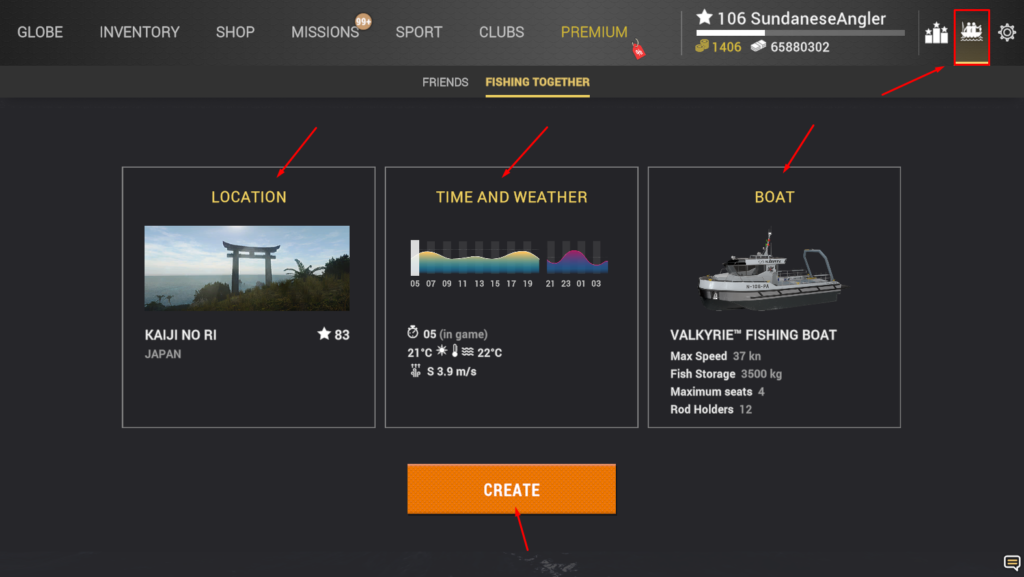
Open the social panel from the boat icon in the top-right corner of the main screen, then switch to the Fishing Together tab next to Friends. This is where you build a session. You will see three panels across the screen, one each for Location, Time and Weather, and Boat, with a big orange Create button underneath. Set all three, then create the session and start inviting people.
Step 1: Choose Your Location
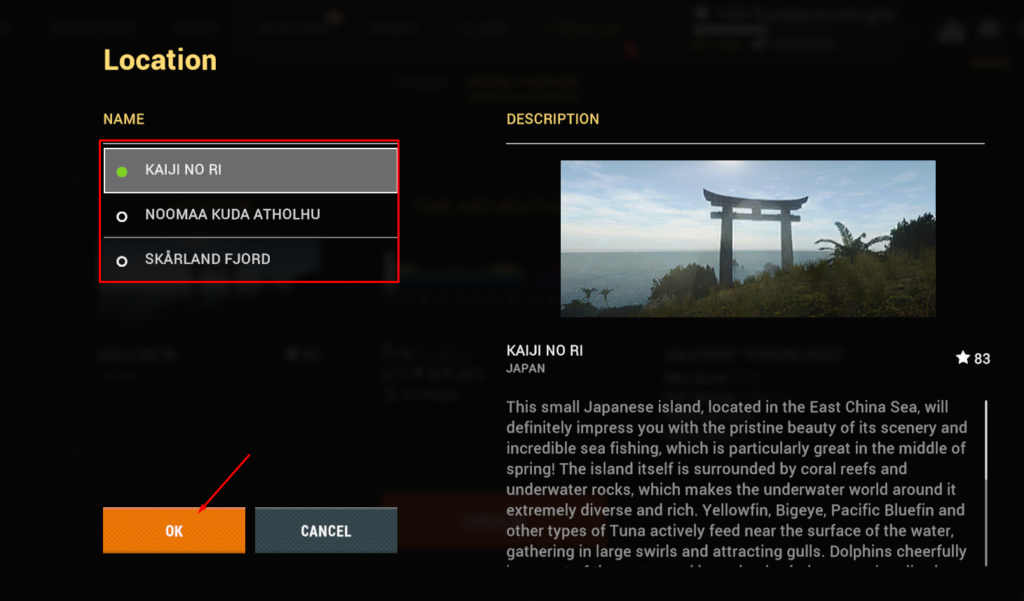
Tap the Location panel to open the waterway list. Each entry shows a coloured dot, and a green dot means that location is available for you to host right now. In my session the choices were Kaiji No Ri in Japan, Noomaa Kuda Atholhu, and Skårland Fjord, with Kaiji No Ri selected and ready to go. Pick the water you actually want to fish, read the description on the right so you know what species and scenery to expect, and confirm with OK. Choose a location that suits the group you are bringing, not just the one you personally want to grind.
Step 2: Set the Time and Weather
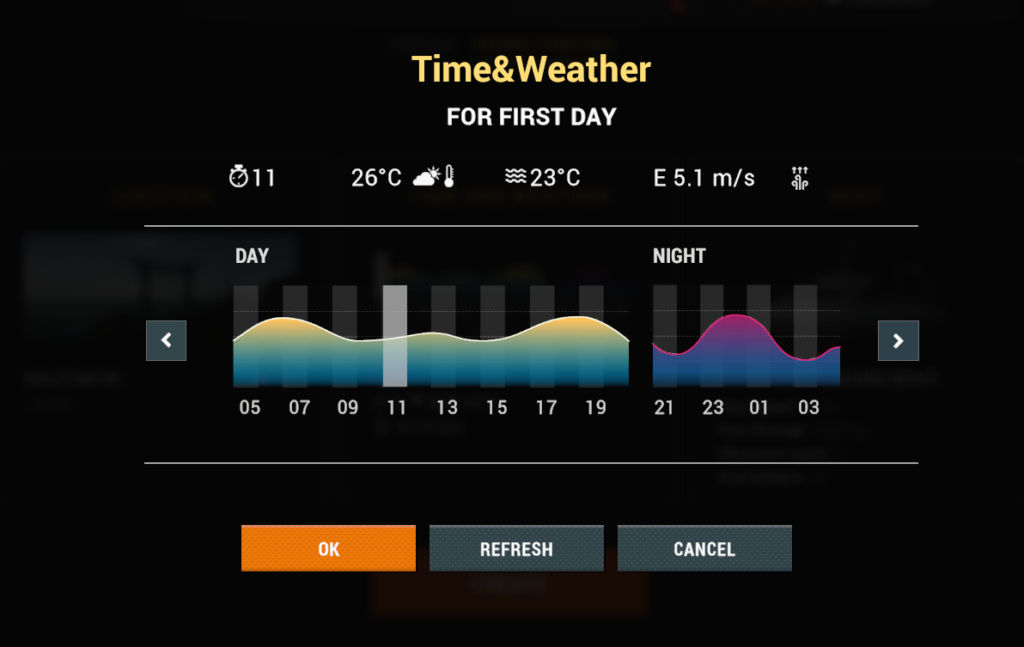
The Time and Weather panel controls the conditions for the first day of the trip. You get the starting hour, the air and water temperature, the wind, and a day and night graph so you can see how the light will move through the session. There is a Refresh button that re-rolls the weather if you do not like what you are given, so you are not stuck with a bad forecast. Since fish activity swings hard with time of day, this step matters more than most hosts think. Set a start time that lands you in a good activity window rather than the dead middle of the day.
Step 3: Pick the Right Boat
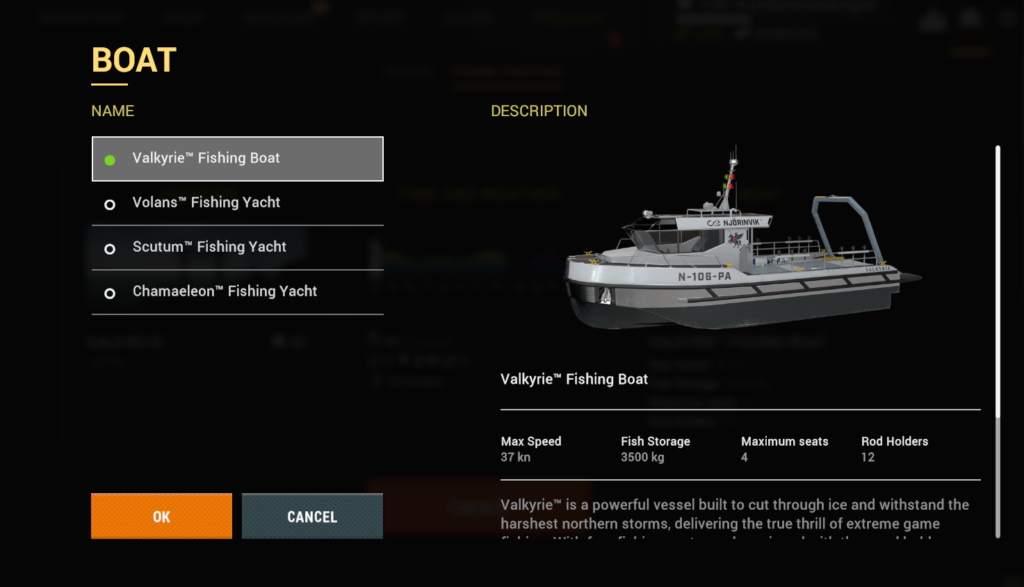
This is the step that decides the size of your group, so choose deliberately. The boat’s Maximum Seats value is the total number of anglers the session can hold, you included. I run the Valkyrie Fishing Boat, which seats four, so I can bring three guests. The list also offers larger fishing yachts like the Volans, Scutum, and Chamaeleon, and if you want to host a bigger crew, one of those with more passenger seats is the way to go. Check the Max Speed, Fish Storage, and Rod Holders too, but for co-op the seat count is the number that matters most.
| Valkyrie Fishing Boat | Value |
|---|---|
| Max Speed | 37 kn |
| Fish Storage | 3,500 kg |
| Maximum Seats | 4 (you plus 3 guests) |
| Rod Holders | 12 |
Step 4: Create the Session and Take the Wheel
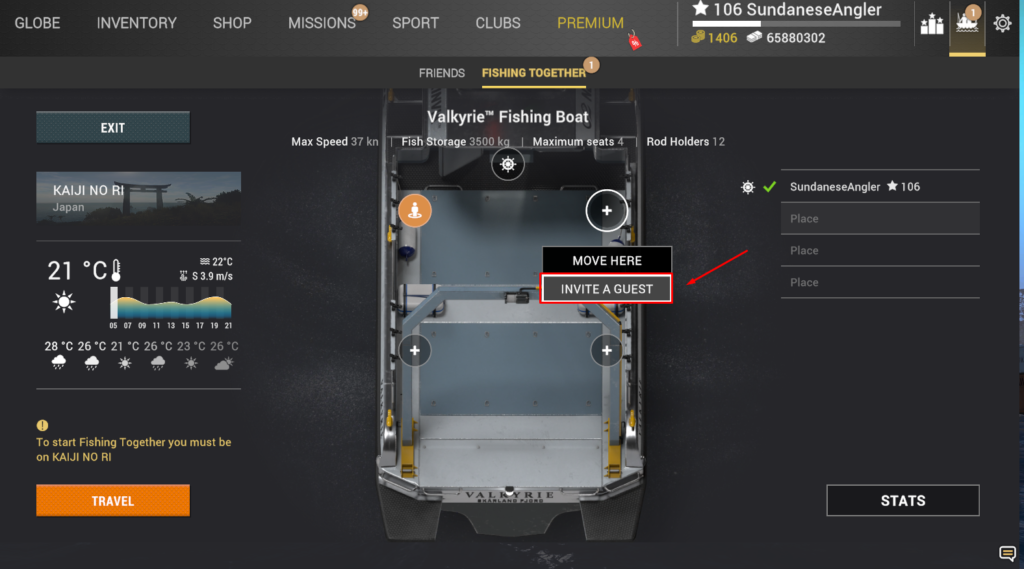
Once you hit Create, the screen switches to a top-down view of your boat deck with the seats marked out. You place yourself first, usually at the wheel as the captain, and the other positions show up as open seats with a plus icon. Tapping an open seat gives you two options: Move Here, which repositions you, and Invite a Guest, which is what you want for filling the boat. The panel on the right lists everyone in the session, with you already locked in as captain and the remaining slots showing as empty Place entries.
Step 5: Invite Friends or Clubmates
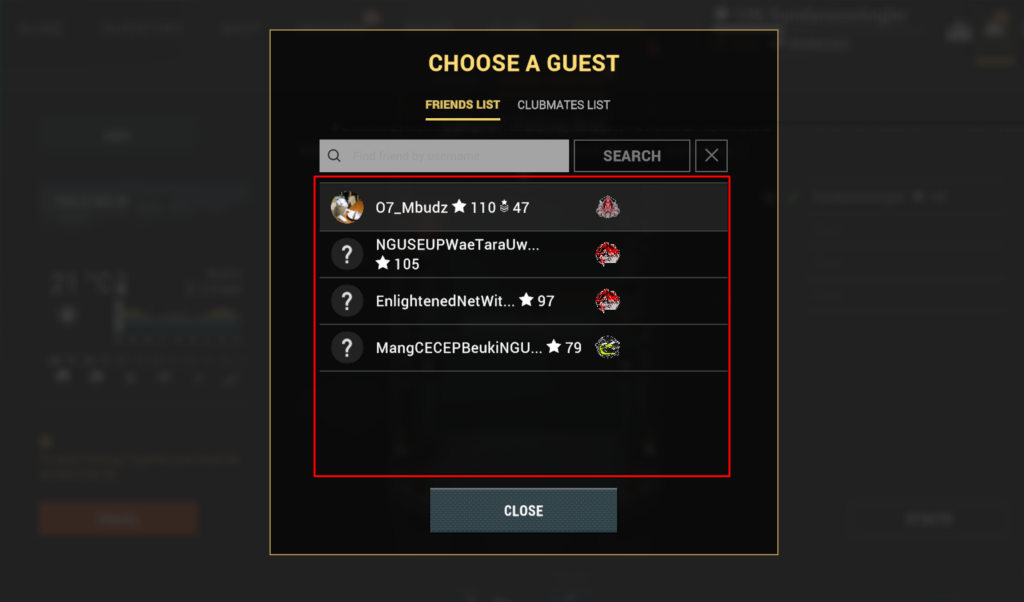
Choosing Invite a Guest opens the guest picker, which has two tabs: Friends List and Clubmates List. You can scroll your friends or use the search box to find someone by username, then send the invite. Each name shows the player’s level, so you can see who you are bringing along. Send the invite, wait for them to accept, and their name fills one of the empty Place slots on the right. Repeat for each open seat until your crew is set.
Step 6: Travel and Start Fishing
Before the trip can begin, you need to actually be at the location you chose. The game spells this out with a reminder that you must be on the selected waterway to start Fishing Together, so if you are somewhere else, you will see the prompt to travel there first. Once you are on location with your guests seated, hit Travel and the shared session begins. From there it plays like a normal trip, except you have company on the deck and everyone is fishing the same water under the same conditions.
Tips for a Smooth Fishing Together Session
Match the boat to the group. There is no point picking a four-seat boat for a five-person crew, and no point hosting a big yacht for one friend. Decide who is coming, then choose the boat that fits.
Set the time before you invite. It is easier to lock in a good activity window and a clean forecast while you are still alone in the menu than to fuss with it after four people are waiting on the deck. Use the Refresh button to re-roll bad weather before anyone joins.
Pick a location your guests will actually enjoy. A brutal endgame map is a rough place to bring a lower-level friend who cannot land anything. Choosing water that suits the whole crew makes for a better session than showing off your hardest spot.
Line up your friends beforehand. Invites need to be accepted, so a quick message to say you are hosting means people are ready to jump in instead of leaving you staring at an empty seat.
Common Mistakes
The most common one is not being on the location when you try to start. The session will not begin until the host is actually at the chosen waterway, so travel there first and save yourself the confusion.
The second is choosing a boat with too few seats and only realising once you have people to invite and nowhere to put them. Sort the boat out in Step 3, before you start sending invites.
The third is setting a bad time of day and then wondering why the bite is slow for everyone. Fish activity applies to the whole session, so a dead window means a dead trip for the entire crew, not just you.
Frequently Asked Questions
How do you fish with friends in Fishing Planet?
Use the Fishing Together tab in the social panel. As the host, you choose a location, set the time and weather, pick a boat, and then invite friends or clubmates into the open seats. Once everyone is seated and you are on the chosen waterway, hit Travel to start the shared session.
How many people can join a Fishing Together session?
It depends on the boat’s Maximum Seats value, which counts you plus your guests. The Valkyrie Fishing Boat seats four, so you can bring three guests. Larger fishing yachts hold more, so pick a boat with enough seats for your group.
How do you invite someone to Fishing Together?
After creating the session, tap an open seat on the boat deck and choose Invite a Guest. That opens a picker with a Friends List and a Clubmates List, where you can scroll or search by username and send the invite. Once the player accepts, their name fills the seat.
Why can’t I start Fishing Together?
The most likely reason is that you are not on the location you selected. The game requires the host to be at the chosen waterway before the session can begin, so travel there first. Also make sure your boat has enough seats for everyone you want to bring.
Can you set the time and weather in Fishing Together?
Yes. The Time and Weather panel lets you set the starting hour and preview the day and night activity for the first day, and a Refresh button re-rolls the weather if you do not like the forecast. Setting a good activity window before you invite people makes for a better session.